You can follow your academic progress through your personal account in the GC Engine learning platform. After signing in, open My Courses and select Online Result to view the results recorded for your course. Where available, Test Details provides further information about individual tests.
Check the relevant module area for assessment instructions, submission deadlines, marking criteria and feedback. Academic progress includes completion of the required assignments, projects, examinations and other assessed activities. Module completion depends on meeting all required assessment components and the Academy’s validation of the results.
For the proposed Bachelor of Arts in Media and Communication, each required assessment component has a minimum pass mark of 51%. Students have three formal attempts per assessment: the initial attempt and up to two resits or resubmissions. Formative practice activities are separate from these formal attempts.
GC Academy monitors participation and progress to identify students who may need assistance. If you encounter difficulties with your studies, deadlines or access to learning materials, contact your module tutor or [email protected] as early as possible.
After 90 calendar days of inactivity, enrolment status is reviewed individually, following prior contact, support and warning. An automated LMS alert does not itself terminate enrolment or cancel previously achieved credits. Requests for an interruption of studies and subsequent return follow the arrangements explained under Taking a break in the course.
If a result appears incorrect or is missing, contact [email protected], identifying the programme, module and assessment concerned. Academic appeals follow the published Academic Appeals Procedure.
If you have forgotten your password, follow these steps:
Select Sign In in the website’s main menu.
Select Forgot password? below the login fields.
Enter the email address associated with your account and select Send.
Check your inbox and follow the instructions in the password-reset email.
If the email does not appear, check your spam or junk folder and confirm that you entered the correct email address.
If you still cannot reset your password, or no longer have access to your registered email address, contact [email protected]. Staff verify account-access requests before making changes.
Keep your new password confidential. GC Academy support staff do not ask you to send your password.
Academic integrity means completing your work honestly, acknowledging the contributions of others and demonstrating your own knowledge and understanding.
Use appropriate references for ideas, quotations, images, data and other material taken from external sources. Follow the assessment instructions on collaboration and identify your individual contribution to group work.
Using artificial intelligence
AI use follows the Academy’s AI and Generative AI Guidance for Staff and Students and the instructions for each assessment. The assessment brief specifies the permitted uses, restrictions and declaration requirements. If these are unclear, ask your tutor before using AI for the task.
Where AI assistance is permitted and materially contributes to your submission, disclose it as required. Identify the tool, explain how it was used and indicate the parts of the work affected.
Check the accuracy of AI-generated information and verify any suggested references. You remain responsible for the accuracy, originality and academic quality of your submission.
Do not use AI where the assessment instructions prohibit it, exceed the permitted limits, conceal assistance that requires declaration or submit fabricated information or references. Declaring AI use does not authorise a use prohibited by the assessment brief.
Review of academic integrity concerns
Similarity reports, AI-detection indicators and proctoring alerts inform human review. An automated score or alert alone does not establish misconduct or determine a penalty.
Formal allegations follow the Academic Integrity and Misconduct Policy. Students receive information about the allegation and an opportunity to respond before a decision is made. The written outcome explains the findings, any applicable consequences and the academic appeal route.
For clarification about referencing, collaboration or permitted AI use, contact your tutor or [email protected].
For questions about GC Academy, programme information or the GC Engine learning platform, please contact [email protected].
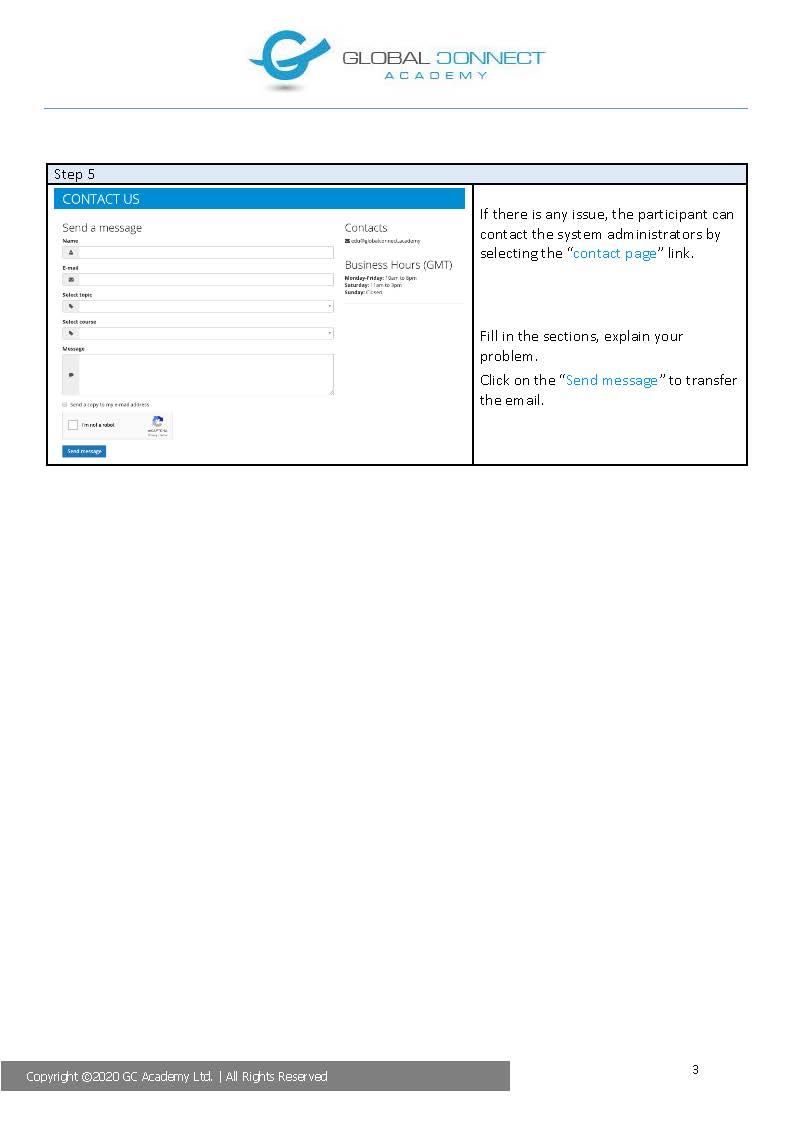
Include your name, the programme or module concerned where applicable, and a brief description of your question. For technical difficulties, include the affected activity, the time the problem occurred, your device and browser, and any relevant error message. Do not include passwords.
GC Academy directs enquiries to the appropriate member of staff for administrative assistance, academic guidance or technical support.
Our target is to provide an initial response from a member of staff within 24 hours during the business hours published on the Contact us page. If your enquiry requires further investigation, the response explains the next steps and when you can expect an update.
English is the language used for communication with GC Academy’s academic, administrative and support staff. It is also the teaching and assessment language of the proposed Bachelor of Arts in Media and Communication.
Please submit your enquiries in English. You may use translation tools to help you understand information or prepare a message. Automated translations can contain errors, particularly in academic terminology and institutional procedures.
If any programme information, policy or instruction is unclear, please request clarification at [email protected].
Each assessment specifies its submission deadline, relevant time zone and any examination or submission requirements. Read these instructions carefully, allow sufficient time to submit your work and check that your submission has been received.
Requesting an adjustment
If illness, personal circumstances, an accessibility barrier or a technical disruption affects your ability to complete an assessment, contact your tutor or [email protected] as soon as possible, preferably before the deadline.
Explain:
The programme, module and assessment concerned.
The deadline or scheduled assessment date.
The circumstances and how they affect your participation or submission.
The adjustment you are requesting.
Any available supporting evidence.
Use a private communication channel for personal or sensitive information. If the circumstances prevent you from contacting GC Academy beforehand, explain the delay when you are able to make contact.
How requests are considered
GC Academy considers requests individually under the applicable assessment rules. Authorised academic staff determine whether an extension, deferral or another appropriate arrangement is justified.
The written decision explains the reasons, any revised dates or arrangements, and the effect on assessment attempts or academic progression. Approved adjustments maintain the programme’s learning outcomes and academic standards.
Submitting a request does not automatically extend a deadline, authorise a missed assessment or reset the number of attempts. Any change requires an authorised decision.
The outcome also identifies the available academic appeal route. Further information is provided under Complaints and appeals.
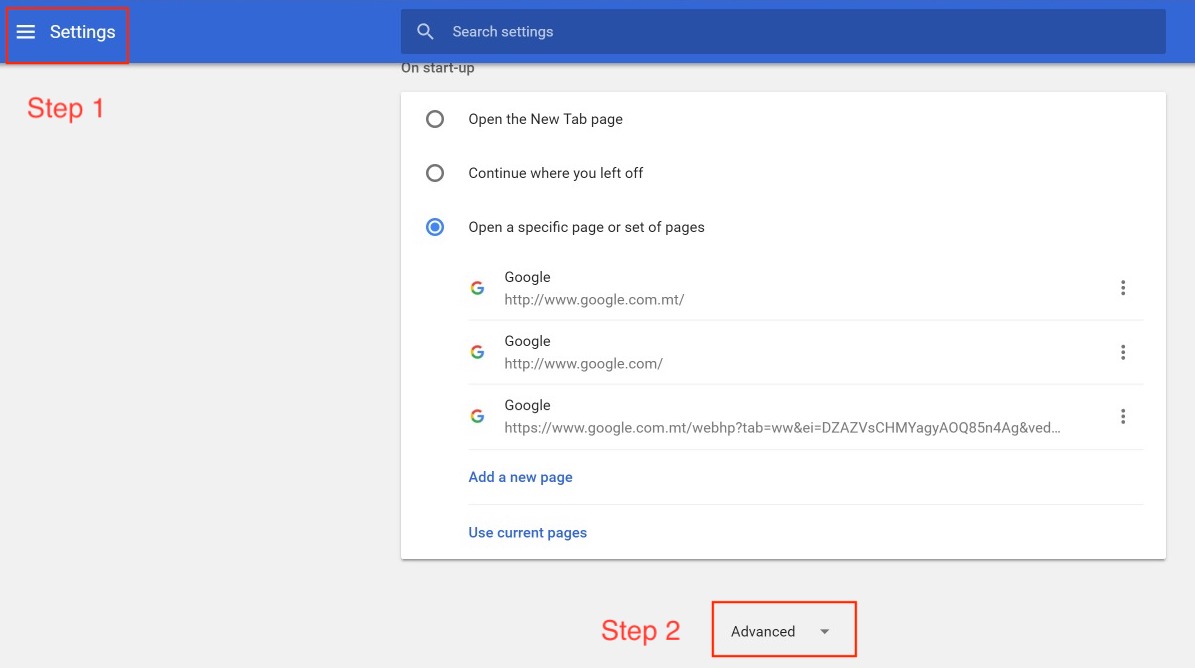
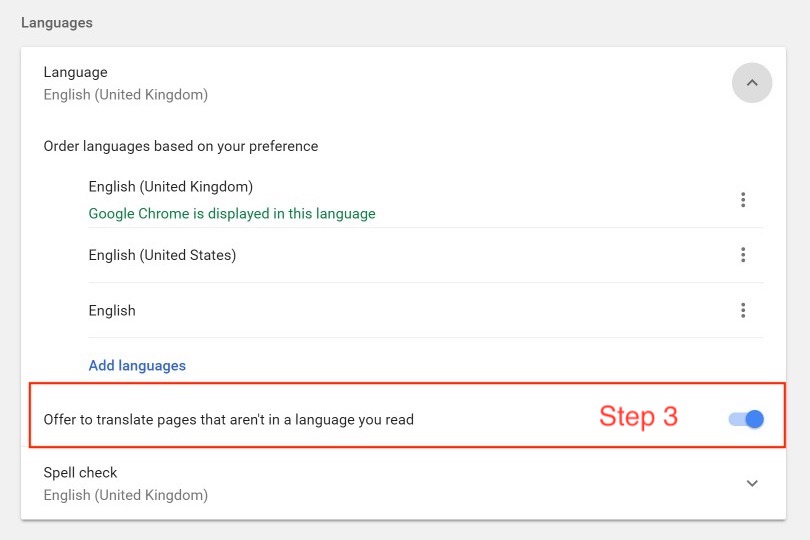
You can change the settings of your CHROME browser to tranlate the platform in your langauge if it is avalable.
GC Academy supports students with disabilities, specific learning needs and temporary barriers affecting participation in online study. Support is considered individually, taking account of the student’s needs and the requirements of the learning activity.
Accessibility features
The GC Engine platform includes features that assist access to learning materials:
Adjustable text size.
Adjustable video playback speed.
Automatic video captioning in multiple languages, available on request.
Contact your tutor or [email protected] for help using these features or requesting captions. Report any captioning or access difficulty so that staff can consider a correction or suitable alternative.
Requesting individual support
Raise access difficulties as early as possible, particularly before an assessment or scheduled activity. Explain the barrier, the module or activity affected, any relevant deadline and the assistance you need. Staff can help you describe and record your request.
Use a private communication channel for personal or sensitive information.
Academic, administrative and technical staff consider the request and discuss appropriate arrangements with you. Additional tools, formats or platform adaptations are addressed case by case. Adjustments support participation while maintaining the required learning outcomes and academic standards.
Agreeing and reviewing support
Agreed individual arrangements are recorded through the Academy’s Individual Learning Support Plan process. The plan identifies the support, responsible staff, implementation dates and review arrangements.
You receive confirmation of the agreed arrangements. Staff review their effectiveness with you and consider changes where a difficulty remains.
Information about your needs is handled confidentially, with access limited to authorised staff who require it for their responsibilities.
Applications, enrolment and payments for the proposed Bachelor of Arts in Media and Communication are not currently open. Creating a platform account or receiving access to a demonstration does not constitute admission to the programme.
The following procedure describes the enrolment arrangements applicable after institutional licensing and programme accreditation, once admissions open:
Admission review: GC Academy checks the applicant’s eligibility against the published programme admission requirements and communicates its admission decision.
Programme information and agreement: The applicant receives the relevant programme information, fees, payment and withdrawal terms, and institutional policies. The Student Agreement is signed by both the applicant and GC Academy before any payment or programme commencement.
Enrolment and account activation: Following completion of the applicable enrolment requirements, Administration confirms student status, activates the individual learning account and provides access instructions.
LMS orientation: Students complete the required orientation before beginning their studies, including guidance on learning resources, assessments, communication tools and support services.
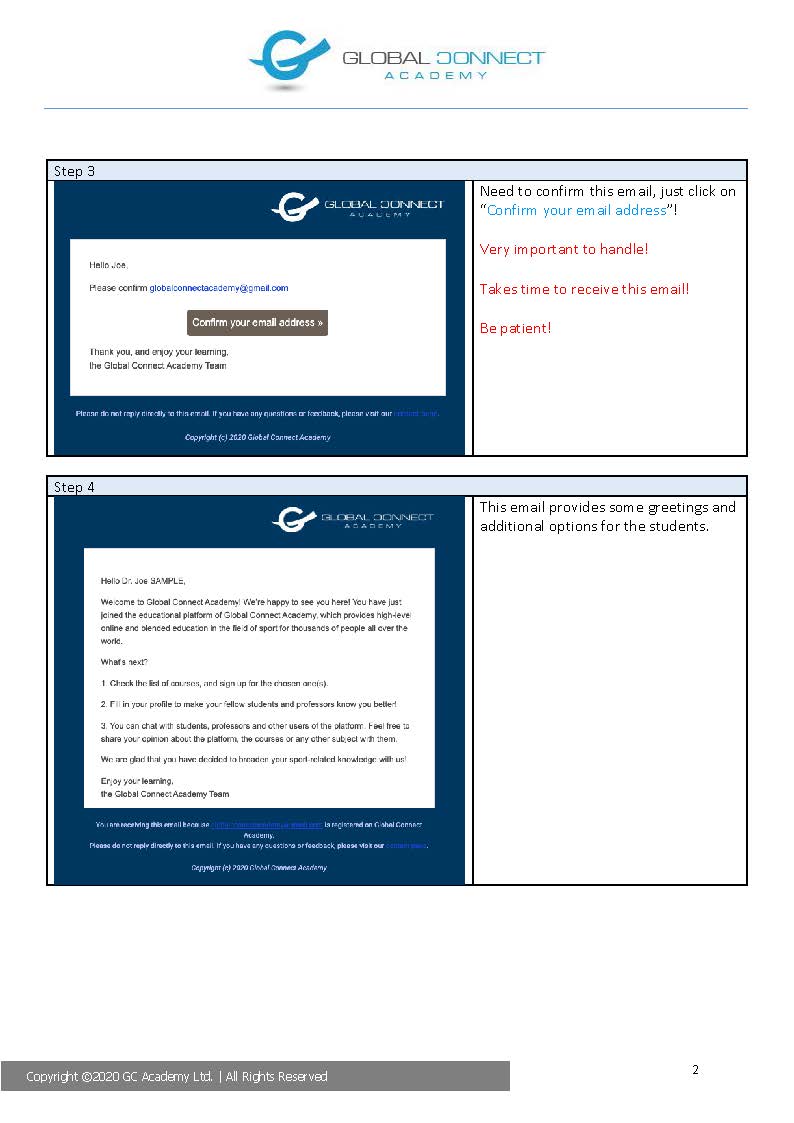
Use a personal email address that you regularly check. Each account is individual: keep your login details secure and do not share your password or allow another person to complete activities in your name.
For enquiries about the proposed programme, contact [email protected].
Users with an activated GC Academy account can sign in as follows:
Select Sign In in the website’s main menu.
Enter the email address associated with your account and your password.
Select Sign In to access your account.
Open My Courses to view the courses and resources assigned to you.
Use only your own account and keep your login details confidential. Sign out after using a shared or public device.
If you have forgotten your password, select Forgot password? on the sign-in page. For other access difficulties, contact [email protected]. Describe the problem and any error message, but do not send your password.
The GC Engine platform includes an integrated digital library search that has operated since 2019. It brings together open-access academic resources through a single search interface, including resources from:
The University of North Texas Digital Library.
arXiv.
The Directory of Open Access Journals.
The Directory of Open Access Books.
The search supports access to books, journal articles, research papers and other digital materials for independent reading, assignments and research.
Resources for your modules
Use the reading list in the relevant module area to identify the required publications, editions and sections. The digital library complements the learning materials provided through the platform.
Check that the resource you select matches the reading instructions. Your tutor can provide guidance on finding and using appropriate academic sources.
Access and permitted use
Access, downloading and sharing follow the permissions of the relevant resource provider. Download materials where permitted and use them in accordance with their conditions. Acknowledge sources appropriately in your academic work.
Missing or inaccessible resources
If a required reading is unavailable, a link does not work or a resource is inaccessible to you, contact your tutor or [email protected].
Identify the module, publication or link and describe the difficulty. Staff review the issue and arrange access or an academically approved alternative. Accessibility needs are considered through the individual learning support process.
Use GC Academy’s digital services respectfully and responsibly. Communicate professionally, protect personal information and use only your own authorised account. Harassment, discrimination, bullying and unauthorised access are prohibited.
Respect the intellectual property and privacy of others. Do not record, publish or share another person’s contribution, assessment work or confidential information without authorisation.
Learning materials and recordings
Recording and access arrangements depend on the activity:
Prepared lecture recordings form part of the programme’s continuing learning materials. They are reviewed and updated through programme monitoring and are not automatically removed at semester end.
Semester webinar recordings are provided to the students enrolled in the relevant semester. Eligible students may download and retain them permanently for personal educational use, subject to the stated permissions and privacy requirements. The LMS copy is removed at the end of the semester.
Other live teaching activities, discussions and meetings are not routinely recorded. Any recording requires a defined purpose, advance information and the appropriate permissions.
Assessment recordings and identity-verification evidence follow their separate assessment, proctoring and privacy procedures.
Downloaded webinar recordings must not be redistributed, republished, sold or made available outside the authorised cohort. Removing a recording from the LMS does not erase copies already downloaded.
Information before recording
Before a session is recorded, participants receive information about its purpose, what is captured, who can access it, any download permissions and the applicable retention arrangements. Recording is announced when it begins.
For ordinary webinars, students are not required to activate their camera or microphone. Informed, voluntary agreement is obtained before an identifiable student contribution is included in a recording.
The tutor provides a way to participate without being identifiable in the recording, such as an anonymised question, a pause in recording or an agreed follow-up discussion. Keeping a camera off is insufficient if a name, voice or other contribution still identifies the student. Choosing this participation route does not attract a webinar participation penalty.
Camera and recording requirements for assessments are explained separately in advance.
Questions and concerns
Contact [email protected] about recording, privacy or inappropriate online conduct. Where recording relies on your consent, you can use this contact to withdraw it. GC Academy explains the action taken and any applicable retention requirements.
Concerns are reviewed through the relevant institutional procedure. Students can report concerns in good faith without retaliation.
The Final Project in Communication and Media Studies is a 12 ECTS individual project in semester six of the proposed Bachelor of Arts in Media and Communication.
The project brings together research, critical analysis and practical application. You investigate a communication or media issue, develop an evidence-based case study, and present and defend your findings.
Supervision
GC Academy assigns a suitably qualified supervisor to support your project. You agree the topic, scope, approach and milestones with your supervisor. Any required ethical approval must be obtained before the relevant research or data collection begins.
Supervision includes at least three scheduled project consultations. Meetings, advice and agreed actions are recorded. Feedback follows the agreed schedule and the programme’s 10-working-day feedback target.
Your supervisor provides guidance on research, analysis, academic practice and progress. You remain responsible for developing and completing your own work, acknowledging sources and following the applicable rules on AI use.
If difficulties affect your progress or access to supervision, contact your supervisor or [email protected]promptly.
Submission and assessment
Before assessed project work begins, you receive the approved project brief, including the required output, length, submission deadline, presentation and questioning arrangements, assessment criteria and integrity declarations.
The case study with presentation forms one combined assessment worth 100% of the module, with a 51% pass mark. The written study, project record and oral defence are assessed together.
Assessment considers research quality, use of theory and evidence, analysis, ethical judgement, practical implications, communication and independent work. Questions during the defence explore your decisions, understanding and interpretation of the findings.
The supervisor and a second qualified academic assessor evaluate the work independently before agreeing a moderated result. External academic moderation of a sample of projects supports consistency of standards. GC Academy retains final academic responsibility.
You receive the validated result, feedback and information about academic appeals. Accessibility needs and technical difficulties are addressed through the relevant support and assessment procedures.
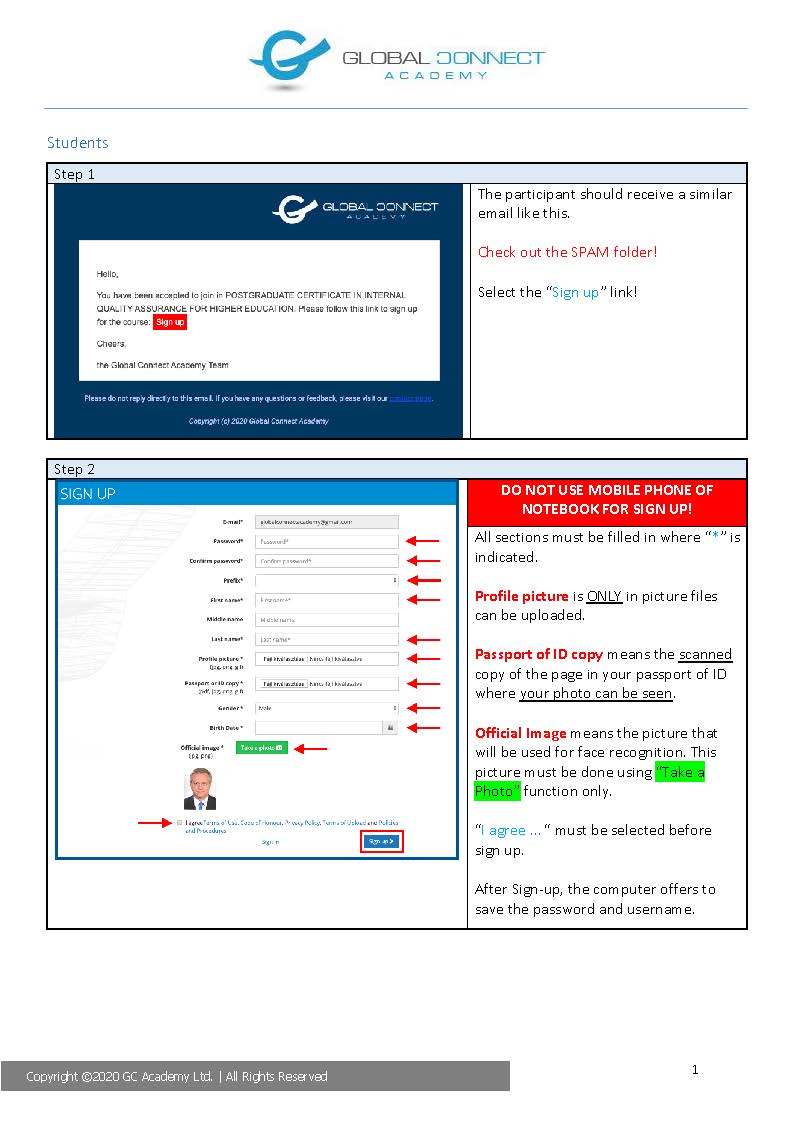
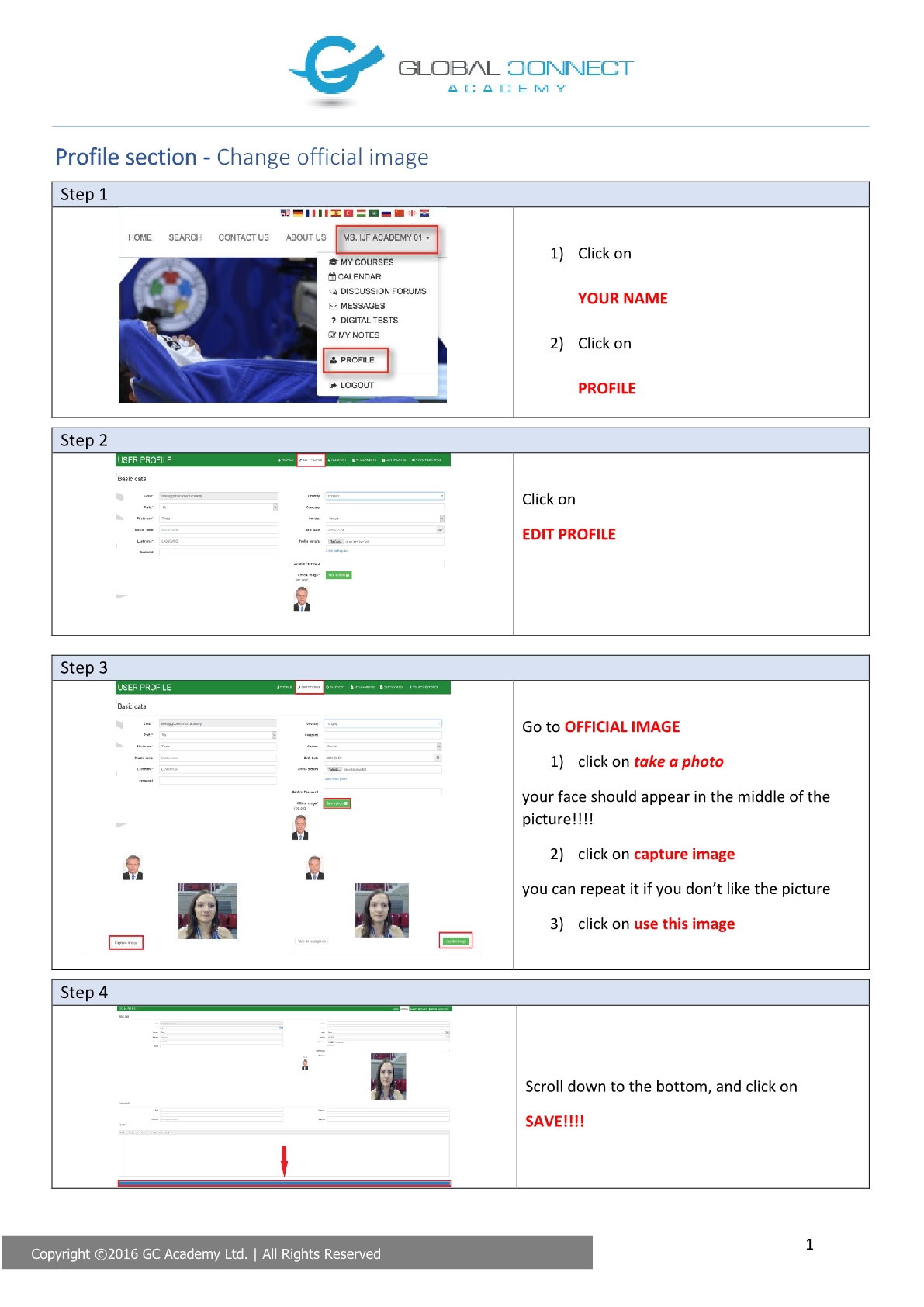
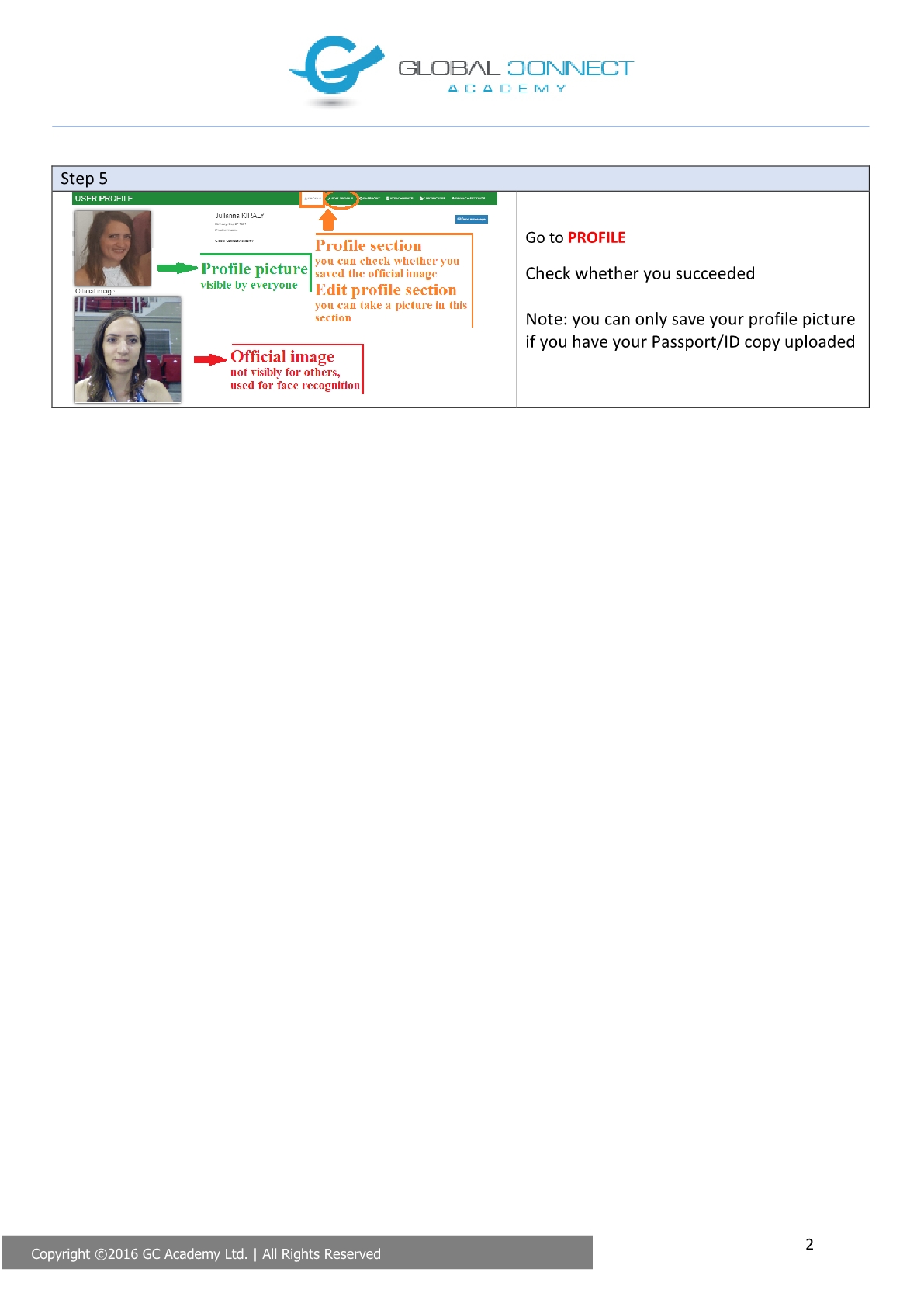
It is essential to have an official image, in case a camera exam is used. The official image is not visible for the other classmates, it is used only for face recognition purposes.
Academic tutors support students in understanding module content, preparing for assessments and developing their study skills. The names and contact details of the instructors, lecturers and tutors are provided in the relevant course or module area of the GC Engine platform.
Discussion forums
The platform provides a forum where students can submit questions about each module or subject and participate in discussions with other students enrolled in the same course. Tutors respond to questions, provide explanations and guide discussion.
The forum’s integrated translation feature enables students to submit questions in their preferred language and helps them follow the discussion. English remains the language of teaching, assessment and formal institutional communication.
Direct communication
Students can contact their tutor directly through the platform’s chat and internal messaging features or by using the tutor’s email address published in the course area.
Use the forum for questions relevant to the wider group. Individual concerns and matters involving personal information should be discussed through a private communication channel.
Tutoring includes guidance on module content, assessment instructions, marking criteria, feedback, academic writing, study skills and finding relevant learning resources. Contact your tutor early if you do not understand a requirement or experience difficulties with your academic work.
Individual meetings and live sessions
Individual online consultations are arranged with the tutor. The meeting time and time zone are confirmed in advance, taking account of the locations of the participants.
The platform supports live sessions through its embedded Wowza functionality. The tutor confirms how to access the scheduled session.
Individual support needs
If a disability, specific learning need or temporary difficulty affects your participation, inform your tutor or contact [email protected]. Requests are considered individually. Agreed adjustments are recorded, communicated to the relevant staff and reviewed with you to check that they address the identified need.
For administrative matters or technical problems, contact [email protected]. Your enquiry is directed to the appropriate member of staff.
Student feedback helps GC Academy review and improve teaching, assessment, learning resources and student support.
Feedback during your studies
You can raise questions, difficulties or suggestions during your studies through your tutor, the platform’s communication tools or [email protected]. Please report problems when they arise so that staff can consider appropriate action while the course is in progress.
Course evaluation questionnaire
After completing a course, students receive an email invitation to an anonymous online evaluation questionnaire. The invitation includes a link to the questionnaire and the submission deadline. The questionnaire remains available for four weeks after the course ends.
The questionnaire includes structured questions and opportunities to add comments and suggestions about your learning experience. These cover teaching, assessment and feedback, learning resources, the online platform and support services.
Review and follow-up
GC Academy Management reviews the responses and shares a summary of the findings with the relevant instructors and tutors. Staff discuss matters requiring attention and agree appropriate improvement actions.
The Academy records the actions, responsible staff and completion deadlines, and reviews progress through its quality assurance processes. Key findings and agreed improvements are communicated to students.
For a personal matter requiring an individual response, contact [email protected] through a private communication channel. Formal complaints and academic appeals should be submitted through the procedures explained under Complaints and appeals, within the applicable deadlines.
GC Academy provides separate procedures for complaints and academic appeals. A complaint concerns matters such as course delivery, administrative services, staff conduct or unfair treatment. An academic appeal requests a review of an assessment result or another academic decision.
How to contact us
Use the Contact us page and select “Complain” or “Appeal” under “Select topic”, as appropriate. For submission guidance or difficulties accessing the platform, contact [email protected].
Include your name, student identifier where applicable, programme and module, the relevant incident or decision and its date, an explanation of your concern, supporting evidence and the outcome you are seeking. Submit personal or confidential information through a private channel.
Complaints
Where appropriate, concerns can first be raised informally with the relevant staff member or department. Informal resolution is encouraged within 10 working days of the incident, where possible.
If informal resolution is unsuccessful or inappropriate, submit a formal complaint to the Quality Assurance Office within 20 working days of the incident, using the Complaint Form specified in the Complaints and Grievances Procedure. Contact [email protected] for assistance with the form and submission.
The QA Office acknowledges receipt within five working days and assigns a Case Officer. The investigation should be completed within 15 working days, with a written decision issued within five working days after the investigation concludes. The decision explains the findings and any corrective action.
If you are dissatisfied with the complaint outcome, you can request a review within 10 working days. A senior member of staff who was not previously involved reviews the matter.
Academic appeals
Submit an academic appeal within 10 working days of receiving the official grade or decision. Grounds include:
Procedural irregularities, including errors in applying assessment requirements or recording results.
Unfairness, bias or a relevant conflict of interest.
Relevant new evidence that was unavailable when the original decision was made.
Inadequate consideration of mitigating circumstances.
Appeals against academic-misconduct decisions can also concern findings unsupported by the evidence or materially disproportionate sanctions.
You can seek clarification from your tutor or module coordinator while preserving the original appeal deadline. Appeals against academic-misconduct findings or sanctions proceed directly to the formal appeal process.
A formal appeal is considered by an independent Appeals Panel with three voting members. People involved in the original assessment or disputed decision do not decide the appeal. External members are included where necessary to ensure independence or appropriate expertise.
The Panel provides a reasoned written outcome within 15 working days of receiving the formal appeal. If exceptional circumstances cause a delay, you receive an explanation and a revised expected date.
Outcomes can include upholding the original decision, correcting an established error, arranging independent re-marking or reassessment, or reconsidering an academic decision under the applicable rules.
Fair treatment and records
Students can raise concerns in good faith without retaliation and can request appropriate support during the process. Records are maintained securely, with access restricted to authorised participants. Decisions and any resulting changes to academic records are documented and communicated to the student.
If personal, health, work or other circumstances interrupt your studies, contact your module tutor or [email protected] as early as possible to request a break.
Include your programme, the modules affected, a brief explanation of your circumstances and your proposed return date. Communicate personal or sensitive information through a private channel.
GC Academy reviews the request and confirms the decision in writing. An approved interruption identifies the relevant dates, your academic position, any agreed changes to deadlines and the support needed for your return.
Returning to your studies
Following an approved interruption, GC Academy agrees an individual return plan with you to support rejoining in the following semester. The plan confirms the modules available, outstanding assessments, remaining assessment attempts, deadlines and any individual support arrangements. It also explains any effect on your expected completion date.
Previously validated academic achievements remain documented in your student record. An interruption does not automatically cancel all achieved credits or require you to restart the entire programme.
Programme and module completion periods
The proposed Bachelor of Arts in Media and Communication is a three-year programme comprising six semesters.
The 12-month module completion period starts from your individual registration date for the relevant module. It is not a 12-month deadline for completing the whole degree. Any authorised change to a module deadline is recorded and confirmed to you in writing.
Keep in contact with GC Academy during the agreed interruption and follow the arrangements in your return plan.
If you decide to withdraw from your course, send a written request to [email protected]. Include your name, student identifier where applicable, programme and the date from which you wish to withdraw.
If your difficulty is temporary, you can request an interruption of studies through the arrangements explained under Taking a break in the course.
Voluntary withdrawal
Administration acknowledges your request and confirms the effective withdrawal date, your enrolment status and any remaining administrative steps in writing.
The withdrawal and its effect on your studies are recorded in your student record. Previously validated results are retained in accordance with the Student Records Management Policy.
Any outstanding fees or eligibility for a refund are determined under the applicable Student Agreement and Tuition and Refund Policy. GC Academy explains the relevant financial position to you in writing.
Termination initiated by GC Academy
Any decision by GC Academy to terminate enrolment follows the applicable academic, student engagement or conduct procedure. The written decision explains the reasons, the effective date and any available review or appeal route.
An automated LMS alert does not itself terminate enrolment. Decisions affecting student status require individual consideration and a documented outcome.
For questions about withdrawal or your enrolment status, contact [email protected].
The GC Engine learning platform supports access from commonly available desktop computers, laptops, tablets and smartphones with an internet connection.
Mobile devices can be used to access learning materials and communication tools. The equipment needed for a particular activity depends on its requirements.
For the Bachelor of Arts in Media and Communication, students need reliable access to a laptop or desktop computer, an internet connection, a webcam and a microphone. Module information explains any additional software, equipment, file formats and associated costs before the relevant activity or assessment.
Check the requirements and test your equipment before a scheduled assessment. If your device cannot support a required activity, or you need an accessibility adjustment, contact [email protected] early so that staff can assess the difficulty and agree an appropriate arrangement.
Online tests and assignment submissions require an internet connection. Each assessment specifies its access period, time limit where applicable, submission deadline and any technical requirements. Check these instructions and your equipment before beginning.
If your internet connection fails or a technical problem prevents you from accessing, completing or submitting an assessment, report it as soon as possible to [email protected].
Include:
Your name, programme, module and assessment.
The date and time of the problem, including your time zone.
A description of the error and how it affected your work.
Your device and browser, if known.
Any available submission confirmation or other relevant evidence.
GC Academy records the incident and investigates the technical circumstances. The responsible academic staff determine whether the assessment can continue, the work can be recovered, an alternative submission arrangement is appropriate or rescheduling is necessary.
A technical interruption does not automatically result in failure or consume an additional assessment attempt. Any decision affecting your deadline, submission or attempt record is documented and communicated to you.
Follow the instructions provided by staff before restarting a timed assessment. Keep any available confirmation of your submission and report a missing or incorrect upload promptly.
Downloadable learning materials support independent study when your internet connection is limited or temporarily unavailable. Download the resources provided in the relevant module area while you have a stable connection, and use them in accordance with their access and sharing permissions.
Live online sessions and interactive platform activities require an internet connection. If your connection is interrupted during a live session, try to rejoin when access is restored.
If you cannot return to the session or miss a required learning activity, contact your tutor or [email protected]. Identify the module, the session date and the difficulty experienced.
Your tutor explains how to catch up using available recordings, readings, presentations or an agreed learning activity. The availability of a recording depends on the arrangements for the particular session.
Continue to follow the published timetable and activity requirements. Any agreed adjustment to participation or a deadline is confirmed with the relevant staff.
For recurring connectivity difficulties, contact GC Academy early to discuss suitable arrangements for accessing materials and participating in your studies.
Some online assessments require camera-based identity verification and examination supervision. The assessment instructions explain these requirements in advance.
Use a device and browser that meet the requirements of the particular assessment. Desktop computers and laptops can use a built-in or external webcam. Tablet or smartphone use depends on confirmed compatibility with the required assessment functions.
Before the assessment, check that your camera works and complete any equipment test specified in the instructions. When prompted during a camera-enabled assessment, allow your browser to access the camera and follow the published supervision instructions.
Camera-based assessment can include identity checks, image capture and assessment reports. Before collection takes place, GC Academy explains what information is collected, why it is needed, who can access it and the applicable retention arrangements.
Proctoring alerts and technical reports are reviewed by authorised staff. An alert alone does not establish academic misconduct.
If a disability, specific learning need or technical limitation affects your ability to use the camera, contact [email protected] before the assessment so that an appropriate arrangement can be considered.
Report camera or connection failures as soon as possible. Technical interruptions are reviewed under the assessment procedures, as explained under Internet access problem for course tests.
GC Engine supports electronic certificate delivery. Course certificates issued through this service are sent in PDF format to the email address registered with the student’s account. Available copies can also be accessed through the student’s profile.
Certificates are issued after the relevant completion requirements have been checked and the outcome has been authorised.
Bachelor’s degree award
For the proposed Bachelor of Arts in Media and Communication, award eligibility requires completion of all programme requirements, including the required modules and Final Project.
Assessment results and programme completion are validated through the Academy’s academic approval procedures. Administration records the authorised award and communicates the arrangements for issuing the official degree certificate to the student.
The platform’s certificate-delivery functionality supports the issuing process; academic approval determines eligibility for the award.
Checking your certificate
Check that your name, programme title and other details are correct. If a certificate contains an error, has not been received following confirmation of issue, or a further copy is needed, contact [email protected].
GC Academy verifies the request and records any authorised correction or replacement in the student’s academic record.
Available transcripts can be downloaded through your personal GC Engine account:
Sign in to the platform.
Open your Profile and go to My Courses.
Select the relevant course and use the Final Results feature to access the available document.
Official transcripts are issued from the Academy’s validated academic records. They reflect results confirmed through the applicable assessment and academic approval procedures.
If a transcript is unavailable online, you cannot access your account, or you need an official copy for further study or employment, contact [email protected]. Include your name, student identifier where applicable, programme and the period of study concerned.
Check the document carefully. Report any missing or incorrect information, identifying the relevant module or assessment.
GC Academy verifies transcript requests and any reported discrepancies. Authorised corrections and replacement documents are recorded in the student’s academic record.